Since so many people have asked me how I'm taking my new pictures I'm going to explain. BUT, I really have little idea of what I'm doing, and this is based on my camera and my crazy set up, so it may or may not help you.
I hope it does!!!
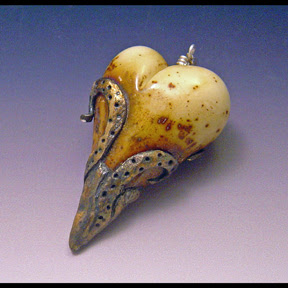
First, a before and after.
BAD PICTURE
GOOD PICTURE
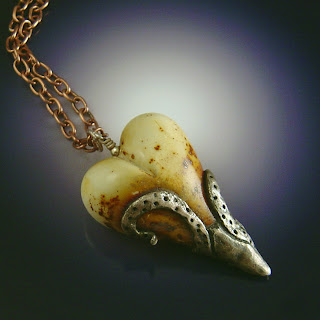
See the difference?

Now let me tell you my secret....shhhhhh........the dramatic lighting in the second photo? It has MUCH less to do with lighting and much MUCH more to do with the background.
In photoshop I made a square, I think 8x8, 300dpi, filled it with black, then used the eraser tool to "erase" a spot of light in the middle. Then, and this is important, I printed it on shiny photo paper. Feel free to use the one I made.
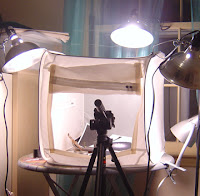
I use a ginormous light tent I bought when I was painting glassware, you do not need anything this huge. I have it lit with 3 cheap-o clamp lights from the hardware store and I'm using 100w GE Reveal bulbs.
I'll tell you how I have my camera set, but this was pure trial and error, and your camera will have more or less settings to screw around with. I have a 5mp Sony Cyber-shot. I always use the macro setting (that little tulip). Under "menu" I set the
METERING MODE to SPOT, the FOCUS to MULTI AUTO FOCUS, and the WHITE BALANCE to LIGHTBULB. Then I play.
When I point the camera at my piece I'll see the lighting change dramatically, and I'll just keep moving it slightly until the white spot on my background is bright, but
the piece I'm photographing has enough contrast. I had to play around with this for a while before I figured out what the look for. Use your tripod, and use the timer on your camera.
I've found that most of the time when I shoot this way I only have to do one touch up in photoshop, and generally it's just an auto color correction. For some reason the background almost always comes out an indigo blue, but if I click auto color correction it changes it back to black while keeping the colors correct on the piece being photographed.
I really hope this was worth the wait. And please, if you have questions I will try my best to answer them.
Happy shooting!!


 She probably sold about 20 of them for me before I cleaned out my supplier of the gunmetal lock & key toggle. And, oh joy...NO ONE ELSE MAKES THAT TOGGLE IN GUNMETAL. No joke. By the time they got more in I was in the height of my show season and got too busy to do any wholesale. So when things slowed down after Christmas Shana emailed me to see if she could have the hearts again, and since I had just gotten 100 toggles I was happy to be back on her sight. I whip up 10 hearts ("whip up"?? hahaha those hearts are the most difficult thing I make!!) and send them on there way.
 The lighting changes the tone of that red, so I suggest she look at them in the daylight. We go back & forth until she sends me a picture of the hearts she had last year. Oh noooooooooo! Can you even believe how much different they are now??? And sure enough, that red is MUCH brighter. Jeez louise.


